This command can also be executed from the SI Editor's Table's Right-click menu.
The Properties command provides access to the Table Properties window, allowing the customization of table headers, size, and borders.
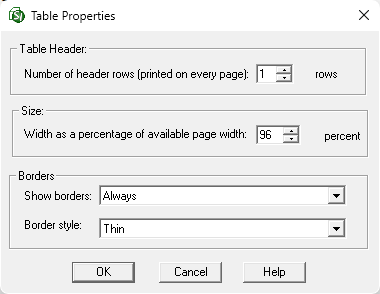
- Table Header: Set the number of header rows to be repeated on each page when printing a multi-page Formatted Table. The default setting is to repeat only the first row.
- Size: The table width can be dynamically adjusted as a percentage of the page width. The default setting for newly inserted tables is 100% of the page width.
- Borders:
- Show borders: Select whether the borders appear Never, Only on screen, Only when printing, or Always. The default setting is Always.
- Border style: Select whether the borders appear Thin, Medium, or Thick. The default setting is Thin.
 To learn more, see the Table Tips and Tricks topic.
Standard Windows Commands
 The OK button will execute and save the selections made.
 The Cancel button will close the window without recording any selections or changes entered.
 The Help button will open the Help Topic for this window.
Additional Learning Tools
 Watch the Formatted Tables eLearning module within Chapter 3 - Getting Started.