SI Editor Right-Click Menus 

In this Topic HideIn this Topic Show
  1. Main Right-Click Menus
    1. Standard
    1. Selected Text
  2. Formatted Table Right-click Menus
    1. Hover Menu
    1. Edit Mode
  3. Navigator's Right-click Menus
    1. Standard
    1. Drag-and-Drop
  4. Technical Support Information

The SI Editor's Right-click menus provide shortcuts to many commonly used commands.

The context-sensitive Right-click menus adapt to the current SI Editor functions offering actions relevant to your current activity.

Main Right-Click Menus

Illustration Icon Indicating How To StepsClick the commands on the image below to learn about the functions available on the Right-click menu.

Standard


Selected Text

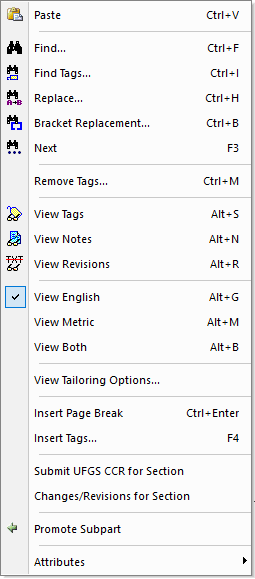
Illustration SI Editor's Right-Click Menu When No Text Is SelectedHyperlink to the SI Editor's Tools Menu - Thesaurus Lookup TopicHyperlink to the SI Editor's Format Menu - Promote Subpart TopicHyperlink to the Tag Attributes TopicHyperlink to the SI Editor's Help Menu - Change / Revisions TopicHyperlink to the SI Editor's Help Menu - Submit a UFGS CCR for Section TopicHyperlink to the SI Editor's Insert Menu - Tags TopicHyperlink to the SI Editor's Insert Menu - Page Break TopicHyperlink to the SI Editor's View Menu - Tailoring Options TopicHyperlink to the SI Editor's View Menu - Both TopicHyperlink to the SI Editor's View Menu - Metric TopicHyperlink to the SI Editor's View Menu - English TopicHyperlink to the SI Editor's View Menu - Revisions TopicHyperlink to the SI Editor's View Menu - Notes TopicHyperlink to the SI Editor's View Menu - Tags TopicHyperlink to the SI Editor's Edit Menu - Remove Tags TopicHyperlink to the SI Editor's Edit Menu - Next TopicHyperlink to the SI Editor's Edit Menu - Bracket Replacement TopicHyperlink to the SI Editor's Edit Menu - Replace TopicHyperlink to the SI Editor's Edit Menu - Find Tags TopicHyperlink to the SI Editor's Edit Menu - Find TopicHyperlink to the SI Editor's Edit Menu - Paste Topic


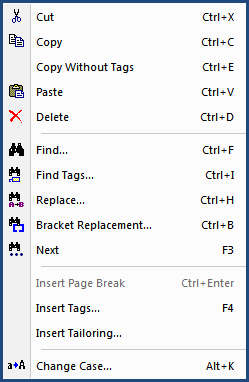
Illustration SI Editor's Right-Click Menu When Text Is SelectedHyperlink to the SI Editor's Edit Menu - Cut TopicHyperlink to the SI Editor's Edit Menu - Copy TopicHyperlink to the SI Editor's Edit Menu - Copy Without Tags TopicHyperlink to the SI Editor's Edit Menu - Paste TopicHyperlink to the SI Editor's Edit Menu - Delete TopicHyperlink to the SI Editor's Edit Menu - Find TopicHyperlink to the SI Editor's Edit Menu - Find Tags TopicHyperlink to the SI Editor's Edit Menu - Replace TopicHyperlink to the SI Editor's Edit Menu - Bracket Replacement TopicHyperlink to the SI Editor's Edit Menu - Next TopicHyperlink to the SI Editor's Insert Menu - Page Break TopicHyperlink to the SI Editor's Insert Menu - Tags TopicHyperlink to the SI Editor's Insert Menu - Tailoring TopicHyperlink to the SI Editor's Format Menu - Change Case Topic

Illustration Icon Indicating Important Information To NoteThe Standard right-click menu provides additional relevant actions like Check Reference, Check SubmittalBrowse to Hyperlink, and Open Referenced Section when you hover and right-click on a Reference (RID), Submittal (SUB), hyperlink (URL), or a Section Reference (SRF).
     

Formatted Table Right-click Menus

Hover Menu

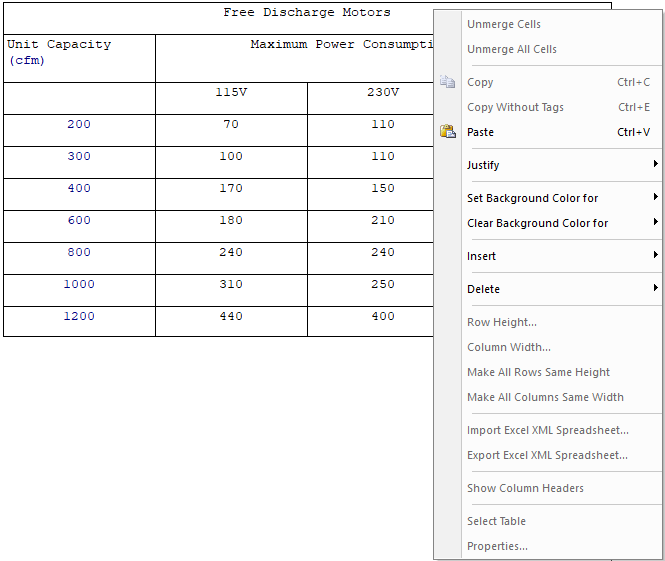
Illustration SI Editor's Formatted Table Right-Click Menu When Hovering Over a CellHyperlink to the SI Editor's Table Menu - Justify TopicHyperlink to the SI Editor's Table Menu - Set Background Color TopicHyperlink to the SI Editor's Table Menu - Clear Background Color TopicHyperlink to the SI Editor's Table Menu - Unmerge All Cells TopicHyperlink to the SI Editor's Table Menu - Unmerge Cells TopicHyperlink to the SI Editor's Table Menu - Insert TopicHyperlink to the SI Editor's Table Menu - Delete TopicHyperlink to the SI Editor's Table Menu - Row Height TopicHyperlink to the SI Editor's Table Menu - Column Width TopicHyperlink to the SI Editor's Table Menu - Make Rows Same Height TopicHyperlink to the SI Editor's Table Menu - Make Columns Same Width TopicHyperlink to the SI Editor's Table Menu - Import Excel XML Spreadsheet TopicHyperlink to the SI Editor's Table Menu - Export Excel XML Spreadsheet TopicHyperlink to the SI Editor's Table Menu - Show Column Headers TopicHyperlink to the SI Editor's Table Menu - Select Table TopicHyperlink to the SI Editor's Table Menu - Properties Topic

Illustration Icon Indicating Important Information To NoteThe Hover right-click menu provides additional relevant actions like Check Reference, Check SubmittalBrowse to Hyperlink, and Open Referenced Section when you hover and right-click on a Reference (RID), Submittal (SUB), hyperlink (URL), or a Section Reference (SRF).


Edit Mode

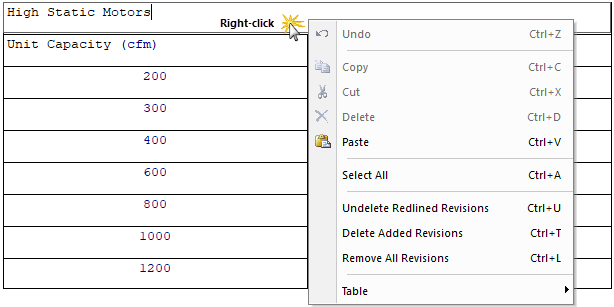
The Edit right-click menu is available when the Edit Mode is active. To activate this menu, click in the cell, then right-click. This menu offers a variety of helpful tools and for added convenience, includes a full pop-up Table right-click menu.

Illustration Icon Indicating How To StepsClick on the image menu option below to display details for each function.

Hyperlink to the SI Editor's Table Menu TopicHyperlink to the SI Editor's Edit Menu - Remove All Revisions TopicHyperlink to the SI Editor's Edit Menu - Delete Added Revisions TopicHyperlink to the SI Editor's Edit Menu - Undelete Redlined Revisions TopicHyperlink to the SI Editor's Table Edit Right-Click Menu - Select All TopicHyperlink to the SI Editor's Edit Menu - Paste TopicHyperlink to the SI Editor's Edit Menu - Delete TopicHyperlink to the SI Editor's Edit Menu - Cut TopicHyperlink to the SI Editor's Edit Menu - Copy TopicHyperlink to the SI Editor's Edit Menu - Undo Topic

Standard


Drag-and-Drop

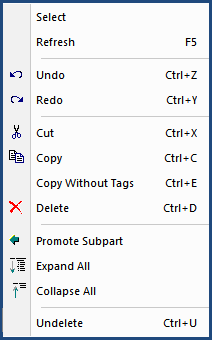
Illustration SI Eidtor's Navigator Right-Click MenuHyperlink to the SI Editor's Navigator - Undelete TopicHyperlink to the SI Editor's Navigator - Collapse All TopicHyperlink to the SI Editor's Navigator - Expand All TopicHyperlink to the SI Editor's Navigator - Promote Subpart TopicHyperlink to the SI Editor's Navigator - Delete TopicHyperlink to the SI Editor's Navigator - Copy Without Tags TopicHyperlink to the SI Editor's Navigator - Copy TopicHyperlink to the SI Editor's Navigator - Cut TopicHyperlink to the SI Editor's Navigator - Redo TopicHyperlink to the SI Editor's Navigator - Undo TopicHyperlink to the SI Editor's Navigator - Refresh TopicHyperlink to the SI Editor's Navigator - Select Topic  

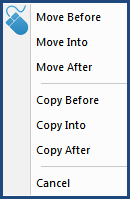
Hyperlink to the SI Editor's Navigator - Copy TopicHyperlink to the SI Editor's Navigator - Move Topic


Users are encouraged to visit the SpecsIntact Website's Support & Help Center for access to all of our User Tools, including Web-Based Help (containing Troubleshooting, Frequently Asked Questions (FAQs), Technical Notes, and Known Problems), eLearning Modules (video tutorials), and printable Guides.

CONTACT US:
  256.895.5505
  SpecsIntact@usace.army.mil
  SpecsIntact.wbdg.org