Submittal Reconciliation is a critical process within SpecsIntact designed to ensure the accuracy and completeness of your project's Submittal requirements. This feature automatically verifies that all Submittals cited in your Sections are properly accounted for and aligned with the 01 33 00 Submittal Procedures Section, helping to prevent omissions and discrepancies.
This process customizes the 01 33 00 Submittal Procedures Section, making it unique to the Job by listing only the Submittal Descriptions (SD-01 through SD-11) used throughout the Job. This process focuses on the Definitions Article. Submittals used in the Sections but not found in the Submittal Procedures Section will be listed on the Submittal Verification Report.
 To ensure proper management, allow Submittal Reconciliation to automatically remove the Submittal Descriptions from the 01 33 00 Submittal Procedures Section. Manual deletion is not necessary and should be avoided.
These modifications affect only the Processed (.prn) files, not the original Section (.sec) files. Each new Processed (*.prn) file overwrites the previous one. If the Submittal Procedures Section is not included in the Job, the Submittal Reconciliation option will not be available.
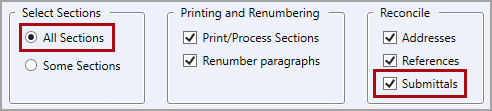
To get correct results, you must select All Sections and verify that Submittals is selected.
 To learn more about Submittals, refer to the Submittal Formatting Requirements and the Submittal Wizard Overview topics.
Additional Learning Tools
 Watch the Submittal Verification Report eLearning module within Chapter 6 - Correcting QA Report Errors and Discrepancies.