SI Explorer Sections Menu 

In this Topic HideIn this Topic Show
  1. Technical Support Information

The Sections menu provides a variety of commands that assist with the management of Sections within SpecsIntact.

Illustration Icon Indicating How To StepsClick the commands on the image below to see how to use each function.
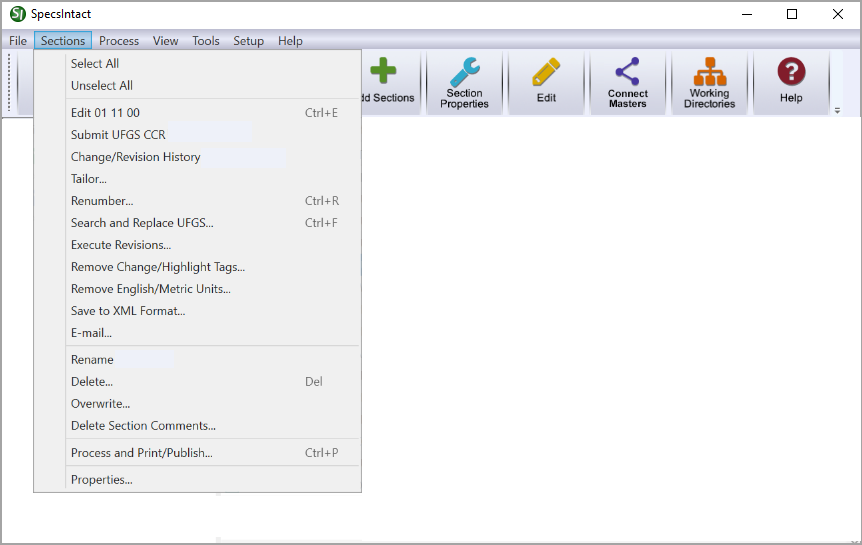
Illustration SI Explorer's Sections MenuHyperlink to the SI Explorer's Help MenuHyperlink to the SI Explorer's Setup MenuHyperlink to the SI Explorer's Tools MenuHyperlink to the SI Explorer's View MenuHyperlink to the SI Explorer's Process MenuHyperlink to the SI Explorer's File MenuHyperlink to the SI Explorer's Sections Menu - Copy TopicHyperlink to the SI Explorer's Sections Menu - Remove Tailoring Tags TopicHyperlink to the SI Explorer's Sections Menu - Properties TopicHyperlink to the SI Explorer's Sections Menu - Process & Print/Publish TopicHyperlink to the SI Explorer's Sections Menu - Delete Section Comments TopicHyperlink to the SI Explorer's Sections Menu - Overwrite TopicHyperlink to the SI Explorer's Sections Menu - Delete TopicHyperlink to the SI Explorer's Sections Menu - Rename TopicHyperlink to the SI Explorer's Sections Menu - E-Mail TopicHyperlink to the SI Explorer's Sections Menu - Save to XML Format TopicHyperlink to the SI Explorer's Sections Menu - Remove English/Metric Units TopicHyperlink to the SI Explorer's Sections Menu - Remove Change/Highlight Tags TopicHyperlink to the SI Explorer's Sections Menu - Execute Revisions TopicHyperlink to the SI Explorer's Sections Menu - Search and Replace TopicHyperlink to the SI Explorer's Sections Menu - Renumber TopicHyperlink to the SI Explorer's Sections Menu - Tailor TopicHyperlink to the SI Explorer's Sections Menu - Change/Revision History TopicHyperlink to the SI Explorer's Sections Menu - Submit A UFGS CCR TopicHyperlink to the SI Explorer's Sections Menu - Edit TopicHyperlink to the SI Explorer's Sections Menu - Unselect All TopicHyperlink to the SI Explorer's Sections Menu - Select All Topic


Users are encouraged to visit the SpecsIntact Website's Support & Help Center for access to all of our User Tools, including Web-Based Help (containing Troubleshooting, Frequently Asked Questions (FAQs), Technical Notes, and Known Problems), eLearning Modules (video tutorials), and printable Guides.

CONTACT US:
  256.895.5505
  SpecsIntact@usace.army.mil
  SpecsIntact.wbdg.org