SI Explorer Process Menu 

In this Topic HideIn this Topic Show
  1. Technical Support Information

The Process menu provides a variety of commands that assist with the processing of Jobs or Masters, while offering convenient conversion tools, and exporting features within SpecsIntact.

Illustration Icon Indicating How To StepsClick the commands on the image below to see how to use each function.
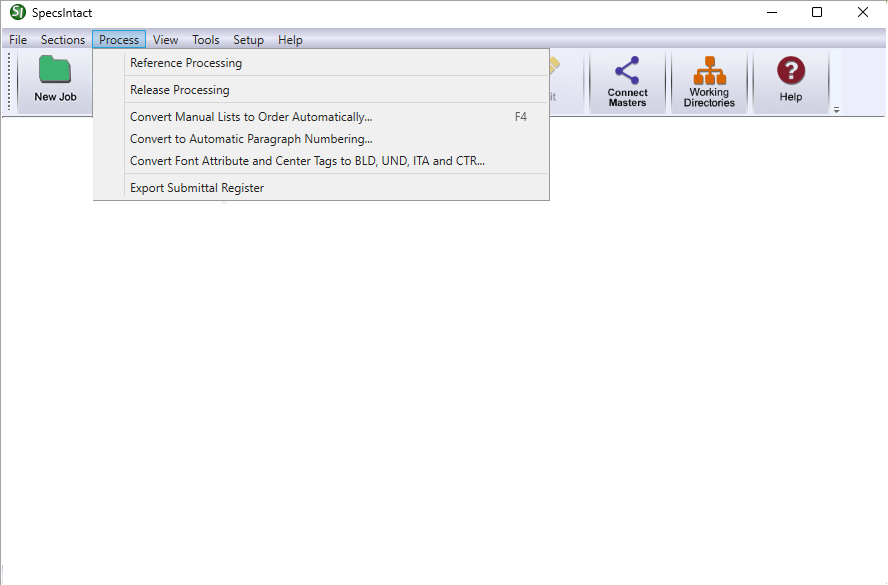
Illustration SI Explorer's Process MenuHyperlink to the SI Explorer's Process Menu - Package Builder TopicHyperlink to the SI Explorer's Process Menu - Export Submittal Register TopicHyperlink to the SI Explorer's Process Menu - Convert Font Attribute and Center Tags to BLD, UND, ITA, and CTR TopicHyperlink to the SI Explorer's Process Menu - Convert to Automatic Numbering TopicHyperlink to the SI Explorer's Process Menu - Convert Manual Lists to Order Automatically TopicHyperlink to the SI Explorer's Process Menu - Release Processing TopicHyperlink to the SI Explorer's Process Menu - Reference Processing TopicHyperlink to the SI Explorer's Help MenuHyperlink to the SI Explorer's Setup MenuHyperlink to the SI Explorer's Tools MenuHyperlink to the SI Explorer's View MenuHyperlink to the SI Explorer's Sections MenuHyperlink to the SI Explorer's File Menu


Users are encouraged to visit the SpecsIntact Website's Support & Help Center for access to all of our User Tools, including Web-Based Help (containing Troubleshooting, Frequently Asked Questions (FAQs), Technical Notes, and Known Problems), eLearning Modules (video tutorials), and printable Guides.

CONTACT US:
  256.895.5505
  SpecsIntact@usace.army.mil
  SpecsIntact.wbdg.org